
Every time you click a link, you’re trusting a string of characters to take you somewhere safe and relevant. But not all URLs are created equal. Some are gateways to valuable content—others, traps set by cybercriminals. Understanding URLs is no longer optional—it’s essential.
Introduction:
A URL (Uniform Resource Locator) is the foundation of web navigation. It’s how browsers find websites, how search engines index content, and how users share information. But beyond convenience, URLs play a critical role in security, SEO, and user experience. In this guide, we’ll explore:
- What a URL is and how it works
- The structure of a URL
- How to identify suspicious URLs
- Tips for creating clean, SEO-friendly URLs
- Tools and resources to deepen your understanding
What is a URL?
A URL is the address of a resource on the internet. It tells your browser where to go and how to get there.
Example:
https://www.example.com/products/shoes?color=red
This URL points to a product page for red shoes on a secure website.
Structure of a URL
Let’s break down the components:
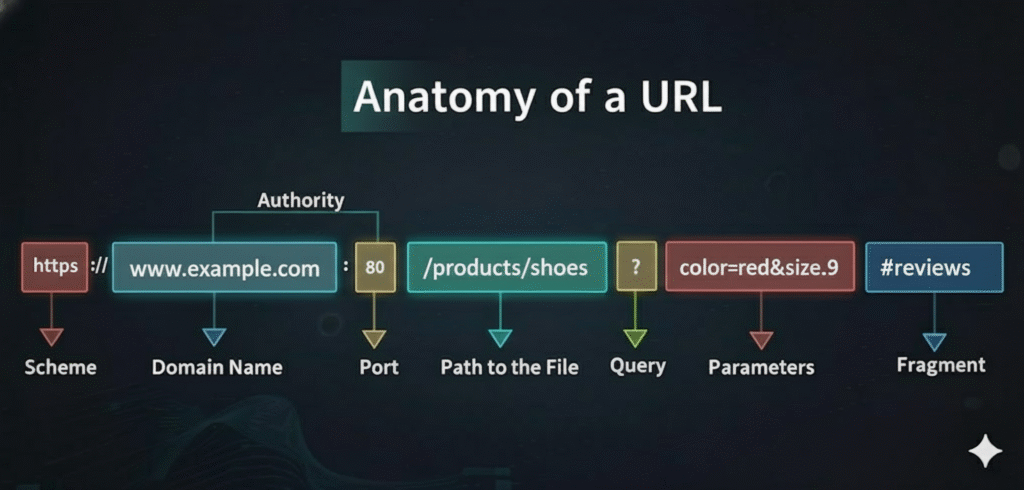
1. Protocol
- Defines how data is transferred
- Common types: http, https, ftp
- https is secure and encrypted—always preferred
2. Domain Name
- Identifies the website (e.g., example.com)
- Can include subdomains like blog.example.com
3. Path
- Points to a specific page or file (e.g., /products/shoes)
- Helps organize content logically
4. Query Parameters
- Pass data to the server (e.g., ?color=red&size=9)
- Used for filtering, searching, and tracking
5. Fragment Identifier
- Refers to a section within a page (e.g., #reviews)
- Doesn’t reload the page—just jumps to a part of it
How URLs Work
When you enter a URL in your browser:
- The browser checks the protocol to determine how to communicate.
- It looks up the domain name via DNS (Domain Name System).
- The server receives the request and returns the resource.
- If query parameters are present, the server processes them accordingly.
How to Spot Suspicious URLs
Cybercriminals often use deceptive URLs to trick users into clicking malicious links. Here’s how to identify them:
🚩 Red Flags:
- Misspelled domains (e.g., gooogle.com instead of google.com)
- Unusual characters or symbols (%, @, &, etc.)
- IP addresses instead of domain names (http://192.168.1.1/login)
- Long, confusing strings with excessive parameters
- HTTPS missing – always look for the padlock icon
✅ Safe Practices:
- Hover over links before clicking to preview the URL
- Use browser extensions like URLVoid or VirusTotal to scan links
- Avoid clicking shortened URLs unless you trust the source
Conclusion
URLs are more than just web addresses—they’re the keys to navigating the internet safely and effectively. Whether you’re a developer, marketer, or everyday user, understanding how URLs work and how to spot suspicious ones can protect you and improve your digital experience.
👉 Want more cybersecurity tips or SEO insights?
Subscribe to our blog and leave a comment.